Last updated: July 15, 2026
Wireless advertising makes the decision look simple: four lines for $25 per line, unlimited service for $40, and no contract.
Those offers may be legitimate, but the advertised price is not the complete wireless arrangement. For a business supplying phones to employees, the phones, porting requirements, hotspot data, support, and replacement process can matter more than the headline price.
The main point: Cheap wireless service is easy to find. Building a reliable wireless setup for a business and its employees is a different job.
What Is an MVNO?
MVNO stands for mobile virtual network operator.
An MVNO sells wireless service using network access purchased from one or more major carriers. The MVNO may handle the customer account, billing, and plan structure, while the underlying wireless network is operated by another company.
This business model can reduce costs. An MVNO may have fewer retail stores, smaller support teams, less equipment inventory, and fewer account-management resources.
That does not automatically make an MVNO good or bad. It means the company has a different structure from a major carrier.
AT&T, Verizon, and T-Mobile are major wireless carriers. They operate nationwide wireless networks.
When T-Mobile advertises four lines for $25 per line, that is an example of a major carrier using promotional multi-line pricing. It is not an MVNO example.
Not Every Discount Brand Is an Independent MVNO
Customers often use the term MVNO for almost every prepaid or discount wireless brand. That is not completely accurate.
- Metro by T-Mobile is owned by T-Mobile.
- Cricket Wireless is owned by AT&T.
- Total Wireless is part of Verizon’s prepaid brand portfolio.
- Red Pocket is a clearer example of an independent MVNO.
Metro, Cricket, and Total Wireless may operate differently from the main postpaid carrier brands, but they are not independent companies competing with the carrier that owns them.
MVNOs Can Also Use Multi-Line Pricing
Multi-line discounts are not limited to the major carriers. Some MVNOs also reduce the effective per-line price when customers place multiple lines on one account.
For example, Red Pocket currently advertises a family plan with the first line at $30 per month and up to four additional lines at $20 per month. Each line includes unlimited talk and text with 20GB of high-speed data under the publicly advertised family offer.
You can review the current Red Pocket Family Plan advertisement.
Red Pocket’s publicly advertised family plan.
Up to four additional family-plan lines under the advertised offer.
Not every MVNO does this. Some charge the same amount per line regardless of how many lines the customer has. Others offer annual pricing, introductory discounts, or shared-data arrangements.
You have to read the actual offer.
Major Carriers Advertise Multi-Line Prices Too
Major carriers frequently advertise the lowest per-line price available when a customer activates several lines.
The large number in the advertisement may not be available to someone who only needs one line.
The T-Mobile and AT&T examples show how multi-line advertising works. Verizon’s current plan shows that wireless advertising changes and not every carrier always uses the same pricing structure.
Four Lines for $25 Per Line Does Not Mean One Line Costs $25
This is where many customers become confused.
An advertisement saying four lines for $25 per line means:
$25 multiplied by four lines equals $100 per month.
It does not mean the customer can purchase one line for $25.
A single line of comparable postpaid unlimited service can cost $65 or more, depending on the carrier, plan, features, and current promotion.
A possible price for one postpaid unlimited line, depending on the carrier and plan.
Four qualifying lines equal $100 for the account before additional charges.
Comparing a $25 multi-line advertisement with a $65 single-line price is not a fair comparison.
The correct comparison uses the same number of lines and similar plan features.
The Terms Can Include More Than the Line Count
Depending on the specific advertisement, the customer may also need to:
- Open new lines
- Transfer phone numbers from another carrier
- Enroll in AutoPay
- Use paperless billing
- Meet credit requirements
- Bring compatible phones
- Finance new phones
- Keep the lines active for a promotional period
A plan advertisement and a phone advertisement may also be combined.
For example, a carrier may advertise four phones at no additional monthly device cost along with four lines for $25 per line. The service promotion and phone promotion may have different requirements.
The service price may require four lines. The phone promotion may additionally require new lines, eligible number transfers, device financing, and continued qualifying service so the monthly device credits keep applying.
The headline gets attention. The conditions determine the real price.
Before deciding that one provider is cheaper, compare:
- The total monthly price for all lines
- The number of lines required
- Whether numbers must be transferred from another carrier
- Whether AutoPay is required
- Whether compatible customer-owned phones are required
- Whether the price is permanent or promotional
- The mobile hotspot allowance
- Taxes, fees, and activation charges
- Equipment costs
- What happens if one line is canceled
The Phone Still Has to Be Paid For
Customers frequently compare a low-cost MVNO plan against a major-carrier plan without including the price of the phone.
If you already own a compatible unlocked phone, a low-cost plan can make financial sense.
The comparison changes when the customer wants a new flagship phone.
A current flagship smartphone can cost around $800 or more. Pro models, larger storage options, and foldable phones can cost considerably more.
When a carrier advertises an expensive phone for free, the carrier is not handing over the phone with no financial conditions.
The phone is usually financed through an installment agreement. The carrier then applies monthly promotional credits to offset some or all of the device payments.
If the customer maintains the qualifying service for the full promotional period, the credits may cover the advertised amount.
If the customer cancels early, the remaining promotional credits normally stop, and the unpaid device balance may become due.
A carrier cannot reasonably give a customer an $800 phone and allow the customer to leave five months later without recovering the remaining cost.
That would not be a sustainable business model.
“No Contract” Does Not Mean “No Financial Obligation”
Most wireless service today does not use the traditional two-year service contract many customers remember. A customer can generally transfer a phone number to another provider.
What keeps many customers financially tied to a carrier is the phone installment agreement and the monthly promotional credits.
A service contract and a phone installment agreement are not the same thing.
You may be allowed to cancel the service, but canceling may cause you to lose the remaining phone credits and become responsible for the unpaid equipment balance.
That can feel like a contract because leaving becomes expensive.
I have worked in wireless since the early years of the industry. Years ago, companies gave customers heavily subsidized phones to begin service. If the customer canceled soon afterward, the company had limited options for recovering the subsidy.
The industry eventually introduced service commitments and early termination fees.
Today, the industry commonly uses device installment agreements and monthly promotional credits.
The paperwork changed. The basic economics did not.
Someone still has to pay for the phone.
Why Red Pocket Works for My Wife and Mother
I am not against MVNOs. I personally use one for family lines.
The publicly advertised Red Pocket family plan described earlier is not the plan my wife and mother currently use.
My wife and my mother each use an individual Red Pocket plan. I pay approximately $20 per month for each line, and each line includes 10GB of monthly data.
That is enough for the way they use their phones. I also supply their phones.
They do not need the provider to finance an expensive flagship phone. They do not need 100GB of mobile hotspot data. They are not using their lines to operate a delivery route, dispatch employees, or run a company.
For them, the lower-cost MVNO arrangement makes financial sense.
This is exactly the kind of situation where an MVNO can be a smart choice:
- The customer already owns the phones.
- The customer has predictable data usage.
- The customer does not need a large hotspot allowance.
- The line is not supporting business-critical operations.
- The lower monthly price is more important than flagship phone promotions.
My Own Phone Uses AT&T and Verizon
My main phone has different requirements.
I use two wireless numbers on the same phone: one with AT&T and one with Verizon.
My AT&T number uses the AT&T Business Unlimited Advanced 3.0 plan, which includes 100GB of mobile hotspot data per eligible line.
My Verizon number is on a grandfathered plan with unlimited phone data and unlimited mobile hotspot access.
I use my phone heavily for business and regularly use approximately 100GB of mobile hotspot data.
Because I am a wireless consultant, having more than one carrier also helps me in the real world.
I can switch between AT&T and Verizon depending on where I am and which network is providing the stronger or faster connection at that location.
Coverage is not identical everywhere. Building construction, tower location, congestion, and the surrounding area can all affect the experience.
My phone is one of my main business tools. If one connection is weak, I can use the other one.
That setup costs more than a $20 MVNO plan, but my requirements are also completely different from my wife’s and my mother’s requirements.
The cheapest plan would not be cheap if it prevented me from working.
AT&T Business: Four Qualifying Lines Can Be About $60
Low-cost wireless service is not limited to MVNOs and prepaid brands.
A qualifying business can currently move four or more smartphone numbers to AT&T Business, keep its compatible phones, and reduce eligible service to approximately $15 per line after promotional bill credits.
The important requirements are:
- The business must move at least four eligible smartphone numbers from another wireless carrier.
- The business must bring compatible smartphones it already owns.
- The lines must activate on an eligible AT&T Business unlimited plan.
- The lines must remain active and in good standing for the credits to continue.
This is not an offer for four newly assigned phone numbers with four new financed phones.
It is based on a qualifying business transferring at least four existing smartphone numbers from another carrier and continuing to use compatible customer-owned phones.
Four-line business example:
$15 per line × four lines = approximately $60 per month, plus applicable taxes and fees.
Depending on the eligible plan price, the offer can provide up to $600 in bill credits per eligible line over 24 months. That works out to approximately $25 per month in credits.
For example, an eligible AT&T Business Advanced 3.0 line priced at $40 could be reduced to approximately $15 after a $25 monthly promotional credit.
AT&T says the promotional credits begin within two bills. Businesses should still be prepared for promotional adjustments to take multiple billing cycles to become fully visible.
Businesses moving fewer than four lines may still qualify for other available promotions, but they would not receive this specific four-or-more-line example.
The number of lines, number-transfer status, phones, and plan selection all affect the final price.
Read the complete offer explanation on my Switch to AT&T Business and Keep Your Phones page.
Business Plans Also Get Less Expensive With More Lines
AT&T Business Unlimited Your Way pricing changes based on the number of eligible phone lines in the plan group.
For example, Advanced 3.0 includes 100GB of mobile hotspot data per eligible phone line.
The regular Advanced 3.0 price can be:
- $70 for one eligible phone line
- $60 per line with two eligible phone lines
- $50 per line with three eligible phone lines
- $40 per line with four through 24 eligible phone lines
- $35 per line with 25 through 50 eligible phone lines
Those prices assume eligible AutoPay and paperless billing. Taxes, fees, equipment payments, optional features, and other charges are additional.
You can review the full plan options on my AT&T Business Unlimited Your Way plan page.
Businesses with larger accounts should also review how their lines are grouped.
AT&T Business Unlimited Your Way 3.0 supports up to 50 total lines in one plan group. However, the lower 25-to-50-line phone pricing is based on the number of eligible phone lines, not the total number of tablets, hotspots, watches, laptops, cameras, and other devices.
Read my AT&T Unlimited Your Way 50-line group explanation for more detail.
A Business With Employees Has Different Risks
Consider a lawn-maintenance company that supplies phones to 20 employees.
The company may use those phones to:
- Send job addresses
- Contact crew leaders
- Change schedules
- Share customer information
- Send job-site photos
- Track field work
- Communicate during emergencies
- Run business applications
If one employee’s service stops working, the owner needs a clear process for fixing it.
The owner should not have to figure out which company manages the account, which company operates the network, and which support department is responsible.
That does not mean the major carriers always provide excellent customer service.
Support across the wireless industry can be fragmented. Customers are frequently transferred between sales, billing, activation, technical support, insurance, fraud, and account-security departments.
That is exactly why a business needs an accountable person who understands the account and owns the problem from beginning to end.
A business with 20, 50, or 500 phones does not simply have a collection of cheap phone plans.
It has a communications system.
Amazon DSP Owners Cannot Shop Only by Price
An Amazon Delivery Service Partner may manage dozens or hundreds of driver phones used for communication, navigation, delivery applications, authentication, photos, and daily operational support.
A failed driver phone is not simply an inconvenience. It can affect a route and the employee assigned to that route.
An Amazon DSP owner should consider:
- Coverage throughout delivery routes
- Phone durability
- Battery life
- Replacement speed
- Spare-device inventory
- Account access
- Activation support
- Device protection
- Seasonal line additions
- Suspending and reassigning lines
- Who will handle billing and promotional problems
A plan that saves $5 per line may not produce a real savings if failed equipment, weak support, or account problems interrupt delivery routes.
Read my Amazon DSP Wireless Solutions Guide for more information about phones, plans, device protection, replacements, and account management.
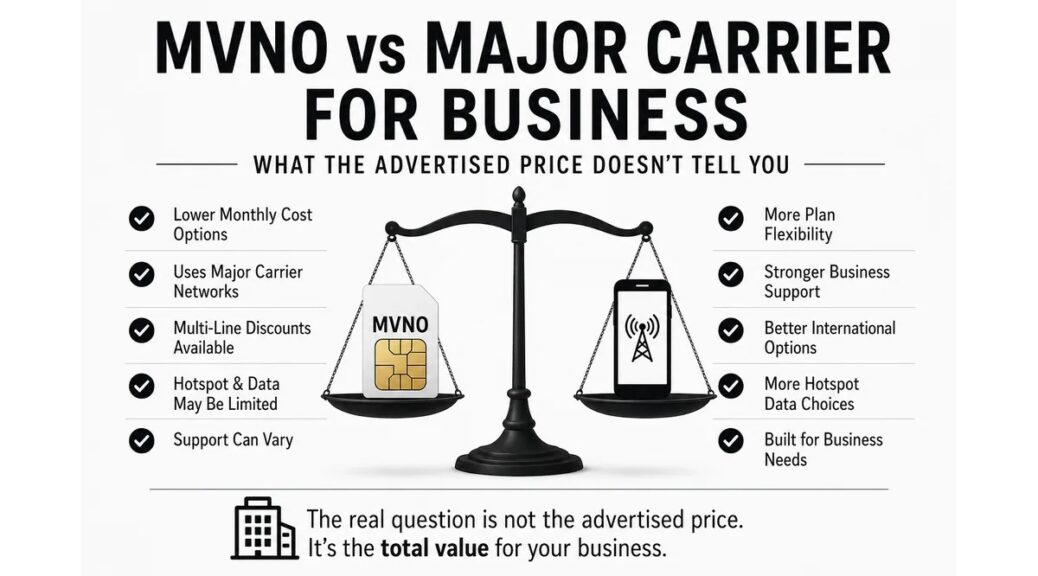
MVNO vs. Major Carrier for Business
| Factor | MVNO | Major Carrier Business Account |
|---|---|---|
| Single-line pricing | Often lower and easier to understand for one line. | One-line pricing can be considerably higher. |
| Multi-line pricing | Varies. Some offer family discounts, while others use flat per-line pricing. | Per-line pricing may drop as more lines are added or when the account qualifies for a promotion. |
| Phones | Often works best when the customer already owns compatible phones. | Usually provides more flagship phone financing and promotional-credit options. |
| Hotspot data | May be limited or reduced on lower-cost plans. | Business plans may offer larger hotspot allowances, including 100GB or more on certain plans. |
| Support | Varies by company and may rely heavily on online, chat, or telephone support. | May provide business account tools, representatives, and additional escalation options. |
| Account size | Can work well for individuals, families, backup lines, and some small businesses. | Generally structured better for growing companies and larger workforces. |
| Equipment management | The customer often supplies and manages the phones. | More options for upgrades, bulk orders, installments, protection, and replacements. |
| Network issues | The provider may need to coordinate with the company operating the underlying network. | The carrier operates the network directly, although support quality still varies. |
The Real Question Is Not the Advertised Price
Customers often ask:
How much is unlimited wireless service?
A business should ask a larger question:
What is the total cost after including the phones, porting requirements, hotspot needs, support, replacements, financing, and employee management?
A $20 MVNO plan may be exactly what an individual needs.
A four-line major-carrier advertisement may be a strong deal for a family.
A $15 AT&T Business line may be an excellent opportunity for a qualifying business transferring at least four smartphone numbers and keeping its compatible phones.
None of those offers is automatically the best choice for every customer.
Cheap wireless service is easy to advertise.
Business-ready wireless requires the right service, compatible equipment, a replacement process, and someone willing to take ownership when something goes wrong.
That is the difference between purchasing a cheap phone plan and managing business communications.
Need Help Setting Up Wireless Service for Your Business?
I work with business owners, fleet managers, and Amazon DSP operators who supply phones to employees and need more than a low advertised price.
I help choose the service, phones, and plan structure that fit the way your team actually works. I also stay involved when an activation, device, billing, or account problem needs to be resolved.
The goal is not to find the lowest number in an advertisement. The goal is to build a wireless setup that works for your business and your employees.
Contact Mobile WiseguyWireless prices, plans, and promotions change. The carrier and MVNO advertisements linked in this article were available when the article was last updated. Review the complete offer terms and eligibility requirements before making a purchasing decision.