Category Archives: 5G

5G

5G is the fifth generation of wireless technology and represents a significant step forward in terms of speed, connectivity, and network capacity. It has the potential to enable a range of new use cases and services, including autonomous vehicles, smart cities, and remote healthcare. Here are some key things you should know about 5G:

  1. Speed: 5G promises significantly faster download and upload speeds than 4G, with some estimates suggesting that it could be up to 100 times faster. This increased speed will allow for real-time video streaming, fast downloads, and seamless connectivity.
  2. Latency: 5G has lower latency than 4G, which means that data can be transmitted with minimal delay. This is particularly important for applications that require immediate response times, such as remote surgery or self-driving cars.
  3. Capacity: 5G networks have the potential to handle a much larger number of connected devices than previous generations of wireless technology. This increased capacity will be important for supporting the growth of the Internet of Things (IoT) and other emerging technologies.
  4. Deployment: 5G is still in the early stages of deployment, and rollout will likely be gradual over the next few years. However, some regions have already begun to launch 5G networks, and many more are expected to follow suit.
  5. Use cases: 5G has the potential to enable a wide range of new use cases and services, from augmented reality and virtual reality to smart cities and autonomous vehicles. As 5G networks become more widespread, we can expect to see more innovative use cases emerge.

Overall, 5G represents a significant step forward in wireless technology, with the potential to revolutionize a wide range of industries and applications. As the technology continues to evolve and become more widely available, it will be important for businesses to stay up-to-date on the latest developments and opportunities.

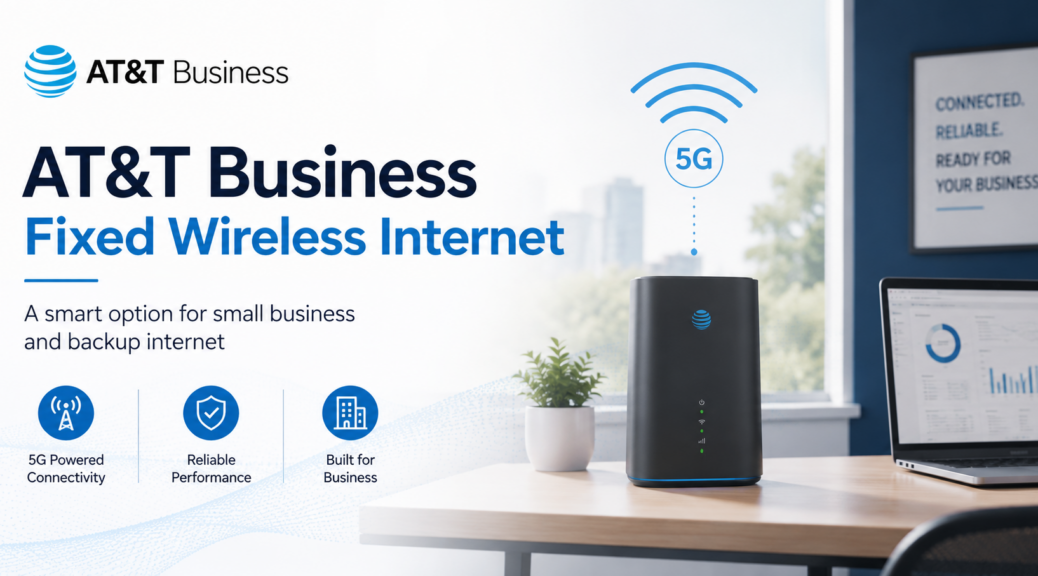
AT&T Business Fixed Wireless Internet: When It Makes Sense for Small Business

Updated: June 19, 2026

AT&T Business Fixed Wireless Internet can make sense when a business needs internet service without waiting on a traditional wired installation.

It is not perfect for every location. It is not always better than fiber or cable. But for the right business, it can be a strong option for fast setup, backup internet, temporary locations, and offices where wired service is slow, expensive, or unavailable.

The smart move is not to ask, β€œIs fixed wireless good?”

The better question is: Does fixed wireless fit this business location, workload, and budget?

What Is AT&T Business Fixed Wireless Internet?

AT&T Business Fixed Wireless Internet is business internet delivered through the wireless network instead of a traditional wired connection like fiber, cable, or copper.

In simple terms, the business gets an internet connection using wireless signal at a fixed location. That makes it different from a mobile hotspot that moves around with a driver, technician, or employee.

Fixed wireless is usually meant to serve a business address. A hotspot is usually meant for mobile use.

Quick take: AT&T Business Fixed Wireless Internet is best when a business needs internet at one location and wants a faster setup than a traditional wired install.

When AT&T Business Fixed Wireless Internet Makes Sense

Business fixed wireless can be useful in several real-world situations.

  • Small offices that need internet without a long wired installation delay.
  • Temporary locations where fiber or cable does not make sense.
  • Construction sites and job sites that need internet before the permanent connection is ready.
  • Backup internet for businesses that cannot afford to be completely offline.
  • Remote business locations where wired options are limited.
  • Retail or service locations that need internet for basic business tools.
  • Amazon DSP offices or dispatch locations that need a practical internet option for daily operations.

The biggest advantage is speed of deployment. Wired internet can take time. Fixed wireless may be easier to install when the location qualifies and the signal is strong enough.

When Fixed Wireless May Not Be the Right Fit

Fixed wireless is not magic. It still depends on signal, network conditions, the building, equipment placement, and how the business uses the internet.

It may not be the best choice if the business has:

  • Weak wireless signal at the address.
  • A large office with many users online at the same time.
  • Heavy video uploads or large file transfers all day.
  • Security camera systems constantly uploading to the cloud.
  • A need for the most stable wired connection possible.
  • Affordable fiber already available at the location.

If fiber is available, priced right, and reliable, fiber is usually the stronger primary internet option. Fixed wireless may still make sense as a backup.

Fixed Wireless vs. Mobile Hotspot

A lot of business owners confuse fixed wireless internet with a mobile hotspot. They are not the same thing.

Mobile Hotspot

A mobile hotspot is better for people who need internet while moving around.

  • Drivers
  • Field technicians
  • Traveling employees
  • Short-term mobile internet use

Fixed Wireless

Fixed wireless is better when the business needs internet at one address.

  • Small offices
  • Dispatch offices
  • Backup internet
  • Temporary business locations
  • Locations waiting on wired internet

If the internet needs to move with a person, look at a hotspot or business data plan. If the internet needs to stay at one business location, fixed wireless may be the cleaner fit.

Related: AT&T Business DataConnect Plans

Fixed Wireless vs. Fiber or Cable Internet

Fiber and cable are usually better for long-term primary internet when they are available, affordable, and reliable.

Fixed wireless becomes more attractive when wired service is delayed, too expensive, not available, or not dependable enough.

Fiber or Cable Usually Wins For:

  • Large offices
  • Heavy daily internet use
  • High upload needs
  • Long-term primary internet
  • Businesses that need the most stable wired connection available

Fixed Wireless Can Win For:

  • Fast setup
  • Backup internet
  • Temporary locations
  • Locations with poor wired options
  • Small teams with basic internet needs

The right answer depends on the address and the business use case.

AT&T vs. Verizon vs. T-Mobile for Business Fixed Wireless

AT&T, Verizon, and T-Mobile all compete in the business wireless internet space. The best option is not the same everywhere.

Coverage can change by address, building type, nearby towers, network traffic, and equipment placement. One carrier may be stronger in one part of town and weaker a few miles away.

That is why a business should not pick fixed wireless only because of a national coverage map or a low advertised price.

The better move is to check:

  • The exact business address.
  • How many people will use the connection.
  • What software or systems will run on it.
  • Whether it is primary internet or backup internet.
  • Whether the business already has fiber, cable, or another wired option.

Related: 5G Fixed Wireless for Business: AT&T vs Verizon vs T-Mobile

Why Amazon DSP Owners Should Pay Attention

Amazon DSP owners often deal with multiple wireless and internet needs at the same time.

  • Driver phones
  • Dispatch office internet
  • Tablets or hotspots
  • Backup internet
  • Device upgrades
  • New lines for new drivers

For an Amazon DSP, fixed wireless may make sense at a dispatch location if the office needs internet quickly or needs a backup connection.

It may not be the right fit if the location has heavy camera uploads, a large staff, or a stronger wired internet option already available.

Related: Amazon DSP Wireless Solutions Guide

What to Check Before Ordering Business Fixed Wireless

Before ordering AT&T Business Fixed Wireless Internet, get the basics right first.

  • Business address: Fixed wireless is location-specific.
  • Current internet provider: Compare it against what the business already has.
  • Monthly cost: Know what the business is paying now.
  • Primary or backup use: Backup internet has a different purpose than primary internet.
  • Number of users: More users can change the recommendation.
  • Business systems: Phone systems, payment terminals, cameras, dispatch tools, and cloud software matter.
  • Installation timeline: Fixed wireless may help when wired internet takes too long.
  • Signal quality: The service only works well if the location has the right wireless conditions.

A cheap internet plan that does not support the business is not a deal. It is a problem waiting to happen.

How Priority Data Can Affect Business Wireless Internet

Business owners should also understand priority data when comparing wireless internet, hotspot plans, and business wireless plans.

Priority data can affect how service performs when the network is busy. This matters for businesses using wireless service for internet access, field work, dispatch operations, or backup connectivity.

Related: What Priority Data Means on Business Wireless Lines

Bottom Line

AT&T Business Fixed Wireless Internet can be a smart option for small businesses, backup internet, temporary locations, and offices that need internet without waiting on a wired installation.

It is not automatically better than fiber or cable. It is not automatically worse either.

The right answer depends on the business address, signal strength, number of users, current internet service, and what the business needs the connection to support.

For many small businesses, the best setup may be wired internet as the main connection and fixed wireless as backup. For others, fixed wireless may be enough as the primary connection.

Related: AT&T Business Plan Calculator and Promotions Details

Need Help Deciding If Fixed Wireless Makes Sense?

Send me the business address, current internet provider, current monthly cost, and what the internet needs to support.

I can help you figure out whether AT&T Business Fixed Wireless Internet makes sense, or whether fiber, cable, hotspot, or another wireless internet option is the better move.

Contact Mobile Wise Guy

Business Fixed Wireless Internet: AT&T vs Verizon vs T-Mobile

Business Fixed Wireless Internet: AT&T vs Verizon vs T-Mobile

Fast setup is the reason to care. Business fixed wireless internet can connect a small office, retail location, remote site, or temporary setup without waiting on a wired install. The tradeoff is simple: reliability depends on the exact address, local network load, and gateway placement inside the building.

Business fixed wireless internet AT&T vs Verizon vs T-Mobile Reliability comparison Fixed wireless vs fiber

Quick verdict

Pick AT&T
You want simple pricing, fast setup, and an AT&T option that includes Turbo treatment on the higher plan.
Pick Verizon
You want defined speed tiers and your address qualifies for strong Verizon 5G Business Internet coverage.
Pick T-Mobile
You want flexible small-business internet options, quick setup, and modern gateway features.

If fiber is available at the address, fiber usually wins for consistency. Fixed wireless is often strongest when you need fast install, a backup circuit, or internet for a hard-to-wire location.

Side-by-side: business fixed wireless internet comparison

AT&T Internet Air for Business

Standard / Premium
Monthly price
With eligible AT&T business wireless plan:
$30 Standard / $70 Premium

Without eligible wireless plan:
$65 Standard / $105 Premium
Speed approach
Speeds vary by address and available wireless service
Key advantage
No speed caps, no data caps, and no overage fees.
Premium includes 250GB of AT&T Turbo for Business.
Best for
Small offices, backup internet, temporary sites, and remote locations
Things to know
Address-based service. Performance can slow during congestion, especially after the higher-priority portion of the Premium plan is used.

Verizon 5G Business Internet

100 / 200 / 400
Monthly price
$69/mo starting point
$39/mo with qualifying smartphone bundle on the 100 Mbps plan
Speed approach
Defined tiers up to 100 / 200 / 400 Mbps
Key advantage
Known tier structure, address check, and bundle savings on qualifying setups
Best for
Offices that want predictable plan tiers and strong Verizon coverage
Things to know
Taxes, fees, Economic Adjustment Charge, promo rules, and address qualification still matter.

T-Mobile 5G Business Internet

Grow / Advanced
Monthly price
Small Business Grow: starting at $30
Business Advanced: starting at $50
Speed approach
Speeds vary by address and congestion
Key advantage
Wi-Fi 7 gateway options, guest Wi-Fi support, and Static IP option on Business Advanced
Best for
Smaller shops, growing teams, quick setup, and multi-location operators
Things to know
Address-based use. Congestion can reduce speeds, and very heavy usage can lead to lower priority on some offers.

This is a working comparison snapshot. Always check the exact business address before you decide.

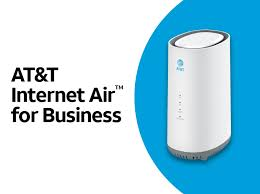
AT&T Internet Air for Business

AT&T Internet Air for Business router and product graphic
  • Current plan display: Standard and Premium.
  • Pricing shift: AT&T now shows lower pricing when the business has an eligible wireless plan.
  • No speed caps, no data caps, and no overage fees are part of the current offer language.
  • Premium includes 250GB of AT&T Turbo for Business before network management may matter more during congestion.
  • Important: this is fixed wireless service, not mobile service. It must be used at the qualified business address.
  • Best fit: backup internet, temporary locations, remote sites, and places where wired install is slow or unavailable.
  • Related: for a simpler breakdown of how network treatment works, read priority data on business wireless lines.
My take: AT&T is strongest here when you want a simple business option and you also like having a direct person to help with the order and follow-through.
Talk to me about AT&T Internet Air for Business Disclosure: I’m an AT&T Business Wireless Consultant and can help with AT&T ordering and account support.

Verizon 5G Business Internet

Verizon 5G Business Internet graphic
  • Defined tiers: Verizon still leans into up to 100 Mbps, 200 Mbps, and 400 Mbps plans.
  • Starting point: Verizon shows plans starting at $69 per month.
  • Bundle push: Verizon markets a $30 monthly savings when paired with a qualifying business smartphone plan, bringing the 100 Mbps plan to $39 in that setup.
  • Switching pitch: Verizon advertises up to $1,500 to help cover switching costs.
  • Guarantee messaging: Verizon highlights a 10-year price guarantee for eligible new customers in select areas and a 30-day satisfaction guarantee.
Best fit: locations that want a clear tier structure and are already in a strong Verizon area.

T-Mobile 5G Business Internet

T-Mobile 5G Business Internet graphic
  • Current business internet pages: Small Business Grow starts at $30 and Business Advanced starts at $50.
  • Hardware angle: T-Mobile highlights Wi-Fi 7 gateway hardware.
  • Advanced plan angle: Business Advanced adds stronger network controls, guest Wi-Fi options, and a Static IP upgrade option.
  • Heavy-use note: T-Mobile says some business internet offers may see lower speeds during congestion and further reduction after very heavy monthly usage.
  • Location rule: service is for use at the location provided at activation.
Best fit: smaller shops, scaling teams, and businesses that want simple setup with more modern SMB-style gateway features.

Reliability comparison: what actually matters

Most business fixed wireless internet comparisons miss the real issue. The biggest factor is the exact address, then building layout, then local network load.

  • Check the exact business address before you commit.
  • Test during your real busy hours, not just early morning.
  • Place the gateway correctly. Window areas and higher placement often help.
  • Think about failover if your point-of-sale or phones cannot go down.

Retail businesses: POS, cameras, guest Wi-Fi

  • POS: consistency matters more than flashy peak speed.
  • Cameras: watch upload behavior and congestion impact.
  • Guest Wi-Fi: keep it separate from business-critical traffic where possible.
  • Temporary locations: this is where fixed wireless often shines.

Fixed wireless vs fiber

If fiber is available, fiber usually wins for consistency, upload performance, and long-term stability. Fixed wireless usually makes more sense when you need:

  • fast installation,
  • a backup circuit,
  • a remote or temporary site,
  • or internet where wired options are limited.

FAQ

  • Which carrier has the best business fixed wireless internet?
    No carrier wins every address. Business fixed wireless internet performance depends heavily on the exact location, building conditions, and local congestion.
  • Is AT&T business fixed wireless internet good for small offices?
    Yes, especially for backup internet, temporary offices, and places where wired install is difficult or slow.
  • Is Verizon or T-Mobile better for business fixed wireless?
    It depends on the address. Verizon is stronger for businesses that want defined tiers. T-Mobile is stronger for businesses that like simple setup and SMB gateway features.
  • Is fixed wireless better than fiber for business?
    Usually no. Fiber is usually better when available. Fixed wireless wins on speed of deployment and flexibility.

AT&T Business Plan calculator and promotions details

🌐 Exciting News for Business Owners! πŸ“±

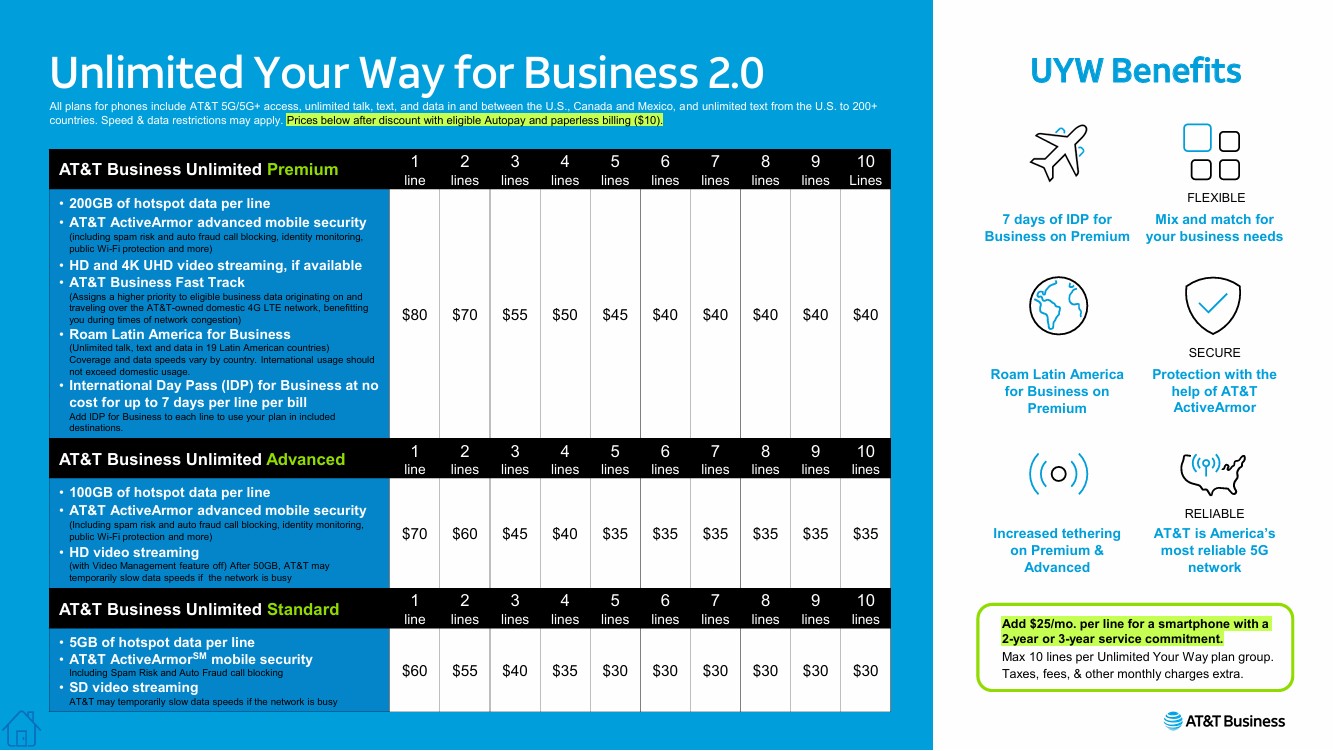
We’re thrilled to announce the availability of AT&T’s Unlimited Your Way for Business 2.0 plans on our website. Tailor your mobile plan to fit your business needs, whether you’re seeking premium features, advanced security, or just the essentials. Here’s what we offer:

infographic detailing AT&T's Unlimited Your Way for Business 2.0 plans with pricing for 1 to 10 lines. Includes Premium, Advanced, and Standard options with features like hotspot data, AT&T Active Armor advanced security, video streaming, and roaming benefits. Highlights benefits such as 7 days of International Day Pass for Business, flexible mix and match options, secure protection, increased tethering, and reliable 5G network coverage. Also notes an additional $25/month discount for smartphones with a 2- year service commitment. Perfect for businesses looking to optimize mobile plans with AT&T Business.

πŸ”Ή AT&T Business Unlimited Premium: Prices from $80 to $40 per line, featuring 200GB of hotspot data, advanced mobile security, HD & 4K streaming, priority data, and roaming benefits.

πŸ”Ή AT&T Business Unlimited Advanced: Prices from $70 to $35 per line, with 100GB hotspot data, robust security features, and HD streaming capabilities.

πŸ”Ή AT&T Business Unlimited Standard: Prices from $60 to $30 per line, providing 5GB hotspot data and standard security features.

πŸ’‘ Pricing Clarity: Please note that all prices listed on our flyer and website already include the Autopay discount of $10 per line, when using a debit card or checking account. Our online Plan Calculator allows you to explore pricing options both with and without the Autopay discount, enabling you to make informed financial decisions tailored to your business needs.

πŸ’³ Flexible Payment Options: Customize how you acquire your devices. Choose from bringing your own device (BYOD), purchasing at full price, opting for monthly installments, or committing to a 2-year service plan to suit your budget and operational requirements.

πŸ“± Device Pricing and Promotions: For a complete list of all AT&T devices available, their costs, current promotions, and a detailed explanation of how financing and promotional credits work, visit AT&T Business Device Pricing, AT&T Business Promotions, and 24-Month Smartphone Financing for Businesses.

πŸ”— Explore and Customize: Visit our site now to use the Plan Calculator and tailor your mobile plans. Discover the perfect mix of flexibility, security, and reliability on AT&T’s 5G network.

Calculate Your Savings and Customize Your Plan

Let’s make managing business communications simpler and more cost-effective!

Image of a business meeting with professionals smiling, holding smartphones with the AT&T logo, and shaking hands in a boardroom, symbolizing their partnership with AT&T. This represents the welcoming of business clients to AT&T’s services, including Unlimited Your Way for Business 2.0 plans, highlighting a successful professional environment.