Last updated: September 18, 2026
I recently found a Samsung phone on the beach, and the experience made me change something on my own phone almost immediately.
The phone was completely dead when we found it. We took it home and charged it because I figured the owner would eventually call and we could arrange to return it.
That sounds simple.
It wasn’t.
What Happened When I Found a Lost Samsung Phone
By the time the phone had enough charge to turn back on, the cellular service appeared to have been shut off or suspended.
Calls weren’t coming in, and I couldn’t make a normal outgoing call from the phone.
I then tried the Emergency Call and Emergency Contact information available from the lock screen.
There was an emergency contact named Rebecca.
The problem was that all the screen displayed was the name “Rebecca.” There was no phone number visible, no digits listed, and no practical way for me to see how to reach her from my own phone.
Because the phone’s line appeared to be suspended, tapping the emergency-contact option wasn’t useful in this particular situation. And because the actual phone number was not displayed, I couldn’t simply read the digits and call Rebecca from another working phone.
That was the real problem: the phone knew who the emergency contact was, but it wasn’t giving me the one piece of information I actually needed to help return the phone.
Emergency services such as 911 are different from calling someone’s personal emergency contact. A phone may still provide emergency-service capabilities even when normal cellular service is unavailable. But in my situation, having Rebecca listed did not give me a usable way to reach her.
So I had a locked phone, an emergency contact named Rebecca, and no practical way to contact her.
I also tried taking the phone to the local police station where I live. The officer would not accept it and suggested taking it to a police station closer to the beach where the phone was found.
At that point, I wasn’t going to continue driving from place to place trying to find someone willing to take responsibility for the phone.
I eventually dropped it off at Best Buy for electronics recycling.
But the whole experience taught me something important.
If Someone Finds Your Phone, Make It Easy for Them to Help You
Most of us spend a lot of time thinking about protecting the information inside our phones.
That’s important.
But there is another side to phone security that we don’t think about enough:
If an honest person finds your phone, can they figure out how to contact you without unlocking it?
My phone is protected by its lock screen, PIN, and biometrics. I’m comfortable showing a small amount of contact information on the lock screen if that information could help me get a lost phone back.
What matters is choosing contact information that still works when the missing phone itself doesn’t.
Don’t Use the Lost Phone’s Own Number as Your Only Contact
This is the biggest lesson I took from finding that Samsung phone.
If you’re adding recovery information to your lock screen, do not rely only on the mobile number assigned to that phone.
Think about what can happen when a phone is lost:
- The battery may be completely dead.
- The carrier may suspend the line after the phone is reported lost.
- The SIM or eSIM may stop working.
- The phone may have no cellular or Wi-Fi connection.
- Incoming calls may no longer reach the device.
- The finder may see an emergency contact name but not the actual phone number.
If your recovery method depends on the missing phone itself being able to make or receive a normal call, it may stop working at exactly the moment you need it.
A better recovery contact should work independently of the missing phone.
Better Contact Information for a Lost Phone
Some better options include:
- A spouse or family member’s phone number
- Another phone number you control
- An office or business phone number
- An email address you can access from another device
- A website or direct contact page
My preference is a short website address that takes the finder directly to a contact form.
Emergency Contact vs. Lock Screen Contact Information
Emergency contacts and visible lock-screen contact information solve two different problems. I think it makes sense to use both when your phone supports them.
| Feature | Emergency Contact / ICE | Custom Lock Screen Contact Information |
|---|---|---|
| Primary purpose | Medical emergencies and reaching someone you trust | Helping someone return a lost phone |
| Visibility | Usually accessed through the phone’s Emergency or Medical ID screen | Displayed directly on the lock screen on supported devices |
| What if normal phone service is unavailable? | Emergency information may still be visible, but contacting a personal emergency contact can depend on available calling or connectivity | The recovery information itself can still be read without the missing phone having active service |
| Best information | Family member, spouse, or trusted emergency contact | Alternate phone number, email address, business contact, or short website |
| Best use | An emergency involving the phone’s owner | Returning a lost or misplaced device |
The key difference is simple: lock-screen recovery information should give the finder something they can use from another device.
Why I Put CurtisM.com on My Samsung Lock Screen
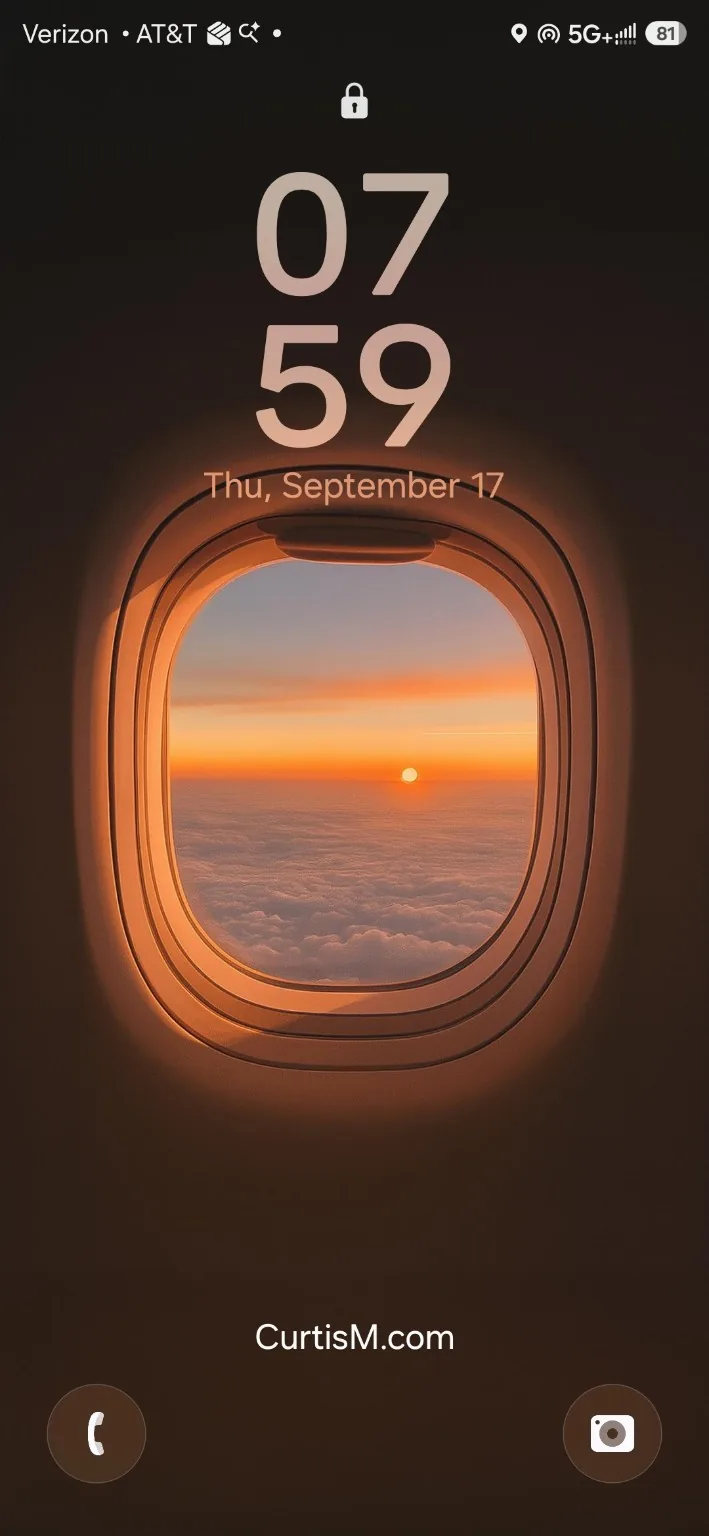
On my Samsung Galaxy S25 Ultra, I use CurtisM.com on the lock screen.
I chose that address for a very specific reason.
It is short, easy to read, and easy for someone to type into another phone or computer. CurtisM.com takes someone directly to a contact page where they can send me a message.
I could have put MobileWiseguy.com on the screen, but then someone who found my phone would have to go to the website, look around, find the contact page, and figure out how to reach me.
With CurtisM.com, there are fewer steps.
That’s exactly what I want from lost-phone contact information: as few steps as possible between finding my phone and contacting me.
How to Add Contact Information to a Samsung Galaxy Lock Screen
Samsung makes this easy on current Galaxy phones.
Go to:
Settings → Lock screen and AOD → Contact information
Enter the information you want displayed, then tap Done.
You might enter something like:
If found: CurtisM.com
Or:
If found, email: yourname@example.com
Or:
If found, call: [alternate phone number]
The important part is that the contact method should still be useful even when the missing phone doesn’t have working service.
You can review Samsung’s official instructions here: Add contact details to your Samsung Galaxy lock screen.
Mobile Wiseguy Tip
If you use a website as your lost-phone contact method, use a short address that goes directly to a contact form if possible.
Don’t make the missing phone’s own mobile number your only recovery method. Use something the finder can access from another device.
What About a Lost iPhone?
Apple handles lost-phone recovery differently from Samsung.
An iPhone does not use the same permanent Contact Information field that Samsung provides, but Apple gives individual users two important tools: Medical ID and Lost Mode through Find My.
Set Up Emergency Contacts in Medical ID
This is something iPhone owners should set up before the phone ever goes missing.
- Open the Health app.
- Tap your profile picture.
- Tap Medical ID.
- Tap Edit.
- Under Emergency Contacts, tap Add Emergency Contact.
- Add the person you want listed.
- Make sure Show When Locked is turned on.
- Tap Done.
This can make emergency information and emergency contacts available from the locked iPhone without providing access to the rest of the phone.
Apple’s official instructions are here: Set up and view Medical ID on iPhone.
Use Lost Mode If Your Personal iPhone Goes Missing
If your iPhone actually goes missing, Apple’s Find My system lets you mark the device as lost and display recovery information on the lock screen.
From another Apple device:
- Open Find My.
- Tap Devices.
- Select the missing iPhone.
- Select Lost Mode or the option to mark the device as lost.
- Follow the onscreen instructions to enter contact information and a message.
You can also use Find Devices through iCloud if you don’t have another Apple device available.
A useful lost-device message could be:
Lost phone. Please email me at yourname@example.com.
Or:
If found, please call my office at 800-555-1234.
If the iPhone is offline when Lost Mode is activated, the recovery message may not appear until the device reconnects to the internet.
Apple’s official Find My instructions are here: Mark an iPhone as lost using Find My.
For Business Phones, Recovery Information Should Belong to the Company
The phone I found was a personal device, but the experience has an even bigger implication for businesses that manage company-owned smartphones.
For a company phone, the recovery information should generally belong to the business, not the employee and not the mobile number assigned to the device.
Why?
- Employees leave companies.
- Phones get reassigned.
- Mobile numbers change.
- Lines get suspended.
- Devices move between employees, departments, vehicles, and locations.
A company-controlled recovery method can stay the same through all of those changes.
That might be:
- An IT help desk number
- A dispatch number
- A shared email address
- A company security number
- A short recovery website or contact form
For example:
Company-owned phone. If found, visit ExampleCompany.com/return or call IT at 800-555-0199.
Lost Phone Recovery for Amazon DSP Wireless Fleets
This is especially relevant for Amazon DSP owners managing driver phones and larger business wireless fleets.
Amazon DSP driver phones spend their days moving through delivery vehicles, parking lots, apartment complexes, loading areas, warehouses, restaurants, gas stations, and customer locations.
They may also be shared between employees or reassigned from one driver to another.
That makes the individual driver’s personal information—or even the wireless number assigned to that particular phone—a poor long-term recovery method.
For an Amazon DSP wireless fleet, a better approach is to make the recovery information belong to the DSP.
For example:
Property of ABC Delivery LLC. If found, visit ABCDelivery.com/phone or call Dispatch at 800-555-0199.
If the phone changes drivers next week, that recovery information can stay the same.
And if the DSP uses Mobile Device Management, or MDM, the business may be able to standardize recovery information across an entire fleet instead of relying on every driver to configure each phone correctly.
For a business with dozens or hundreds of driver phones, that becomes much more important.
Lost-device recovery is only one part of managing an Amazon DSP wireless account. DSP owners also have to think about reliable driver phones, new lines, upgrades, replacement devices, carrier coverage, device protection, hotspots, and account control.
For a broader look at those issues, see my Amazon DSP Wireless Solutions Guide.
MDM Gives Businesses a Second Layer of Lost-Phone Protection
Mobile Device Management, often called MDM or UEM, gives businesses far more control over company-owned smartphones than an individual user normally has.
MDM cannot prevent somebody from leaving a phone in a delivery van, restaurant, hotel room, warehouse, parking lot, or customer location.
But it can help a company prepare for that situation and respond much faster when it happens.
I think about business lost-phone recovery in two layers:
- Before the phone is lost: Put company-controlled recovery information on the device where the management platform and device configuration support it.
- After the phone is reported lost: Use the company’s device-management tools to lock it, display recovery instructions, locate it where supported, and wipe it if recovery is no longer realistic.
Those two layers are important because remote management commands still need to reach the device.
If the device is powered off, completely dead, or disconnected from available networks, a remote command may not be processed until the phone reconnects.
A recovery message that was already configured on the lock screen before the phone disappeared does not depend on a new remote command arriving after the loss.
Samsung Knox Manage Can Help Businesses Recover Lost Galaxy Phones
Businesses deploying Samsung Galaxy phones can use Samsung Knox Manage for much more than basic security.
On supported managed Android configurations, administrators can configure a custom lock-screen message.
That means a company may be able to standardize recovery information across managed devices instead of asking each employee to enter it manually.
A company could display:
Property of ABC Delivery. If found, visit ABCDelivery.com/return or call 800-555-0199.
That information belongs to the company, so it can remain consistent even when the phone is reassigned to another employee.
Knox Manage also supports lost-device and remote-lock capabilities on supported managed configurations.
Depending on the Android version, device ownership model, enrollment method, and management configuration, administrators may be able to:
- Lock a device remotely
- Enable Lost Mode on supported configurations
- Display a custom lost-device message
- Display a recovery phone number
- Display an email address or other recovery information
- Request device location information where supported
- Take additional security actions if the device cannot be recovered
Samsung documents its Android Enterprise management policies here: Samsung Knox Manage Android Enterprise policies.
Android Enterprise Can Support Lost Mode Beyond Samsung
This concept is not limited to Samsung phones.
Google’s Android Enterprise management framework supports Lost Mode for compatible company-owned Android devices when the organization’s management platform supports the feature.
Android Enterprise Lost Mode can allow administrators to remotely lock a company-owned device and display recovery information.
Depending on the supported configuration, recovery information can include:
- A lost-device message
- A phone number
- An email address
- A business address
- The organization’s name
This means businesses using Android phones from different manufacturers may have similar recovery options through their MDM or UEM platform.
The exact capabilities depend on the Android version, device ownership model, enrollment method, and management platform being used.
Google documents Android Enterprise Lost Mode here: Android Enterprise Lost Mode.
Apple Business and Managed Lost Mode for Company iPhones
Businesses managing iPhones have enterprise recovery options as well.
Apple Business Manager is now part of Apple Business. Apple Business combines capabilities previously provided through Apple Business Manager, Apple Business Essentials, and Apple Business Connect into Apple’s current business platform.
Businesses can use Apple Business and compatible device-management services to enroll, configure, and manage company-owned iPhones, iPads, and other Apple devices.
For business-owned Apple devices, proper enrollment and supervision are particularly important because they provide stronger management capabilities than an unmanaged personal device.
Managed Lost Mode for Supervised iPhones and iPads
A supervised company-owned iPhone or iPad can be placed into Managed Lost Mode through a supported device-management service.
Managed Lost Mode can allow an administrator to:
- Lock the device
- Display a customized recovery message
- Display a phone number or other contact instructions
- Request the device’s location
- Play a sound to help locate the device
This gives a business a much more structured recovery process than simply hoping an employee configured useful recovery information before losing the phone.
A company could display:
Company-owned iPhone. If found, call our IT department at 800-555-0199 or visit ExampleCompany.com/return.
Apple explains Managed Lost Mode and managed device recovery here: Lock and locate managed Apple devices.
Device Management Has to Be Set Up Before the Phone Is Lost
This is one of the biggest lessons for businesses.
Management tools only help if the device is properly enrolled and managed before it disappears.
Company-owned Apple devices can use options including Automated Device Enrollment so the organization can establish management during deployment.
The same general principle applies to Android devices: a business should establish management, security, and lost-device procedures when phones are deployed, not after one goes missing.
Apple’s current business deployment information is available here: Apple Business device enrollment methods.
MDM Does Not Replace Visible Lock-Screen Contact Information
MDM is powerful, but it does not eliminate the lesson I learned from the phone on the beach.
A new remote management command still needs to reach the device.
If the phone is dead, powered off, or disconnected from available networks, a Lost Mode or remote-management command may not be processed until the device gets back online.
That is why I like a two-layer approach for business phones:
Layer 1: Put useful company-controlled recovery information on the phone before it is lost whenever the device and management configuration support it.
Layer 2: Use MDM Lost Mode, remote lock, location, and remote wipe capabilities after the device is reported missing.
The first layer helps the honest person standing there holding the phone.
The second layer helps the business protect and manage the device remotely.
Mobile Wiseguy Business Tip
For company-owned phones, make the recovery information belong to the company, not the employee and not the device’s mobile number.
Use a company IT number, dispatch number, shared email address, security number, or short recovery website. Then use your MDM platform to standardize that information across managed devices whenever possible.
A Simple Lost-Phone Policy for Business Fleets
If I were setting up a fleet of company smartphones, I would want a lost-device process in place before the phones are handed to employees.
- Enroll company-owned devices in the appropriate management platform. Don’t wait until a phone disappears.
- Use company-controlled recovery information. An IT number, dispatch number, shared email, or recovery website is usually more durable than the device’s assigned mobile number.
- Standardize the recovery message across the fleet. Don’t depend on every employee remembering to configure it correctly.
- Know how to activate Lost Mode or remotely lock a device. IT or operations personnel should know the process before an emergency occurs.
- Decide how carrier suspension fits into the recovery process. Suspending wireless service may help protect the account, but the business should also understand how loss of connectivity may affect remote device-management commands.
- Have a remote-wipe policy. If a device cannot be recovered or contains sensitive business information, the company should know when recovery efforts end and data protection becomes the priority.
The exact process will depend on the company’s security requirements, the type of data stored on the phones, the device-management platform, the operating system, and how the devices are enrolled.
Lost Phone and Business Wireless FAQ
What contact information should I put on my phone’s lock screen?
Use contact information that does not depend on the missing phone itself. Good options include an alternate phone number, spouse or family member’s number, email address, business number, or a short website that leads directly to a contact form.
Should I use the mobile number assigned to the lost phone?
You can include it, but I would not make it your only recovery method. If the carrier suspends the line, the SIM or eSIM stops working, or the phone loses normal cellular service, that number may not provide the finder with a practical way to reach you.
Should Amazon DSP driver phones use the driver’s personal information?
For company-owned Amazon DSP driver phones, company-controlled recovery information is generally more practical. Drivers change, phones get reassigned, and wireless lines may be suspended or replaced. A DSP-controlled dispatch number, shared email address, IT contact, or recovery website can stay consistent across the fleet.
Can MDM help an Amazon DSP manage lost driver phones?
Yes. Depending on the devices, enrollment method, operating system, and MDM platform, a DSP may be able to remotely lock managed phones, display recovery instructions, request location information, place supported devices into Lost Mode, or wipe devices that cannot be recovered.
Why is lost-phone recovery important for an Amazon DSP wireless fleet?
Amazon DSP phones move constantly between drivers, vans, delivery stops, warehouses, and dispatch locations. A standardized recovery process can make it easier to recover company equipment while also protecting business data and reducing the disruption caused by a missing driver phone.
Does Lost Mode work if the phone is completely dead?
A phone that has no power cannot immediately process a new remote command. If a Lost Mode command is sent while the device is offline, the exact behavior depends on the platform and configuration, but remote actions generally require the device to power back on and regain the necessary connectivity before they can be processed.
Take Two Minutes and Check Your Phone
Finding that Samsung phone on the beach changed the way I think about lost-phone recovery.
The person who finds your phone may genuinely want to give it back.
But you have to give them a practical way to reach you.
My phone stays locked because I want the information inside it protected.
At the same time, my lock screen gives an honest person a simple way to contact me without needing access to anything inside the phone.
For businesses managing smartphones, that same idea can be taken much further with Samsung Knox, Android Enterprise, Apple Business, and other MDM or UEM platforms.
And for an Amazon DSP owner managing a fleet of driver phones, having a consistent lost-device process can be far more effective than handling each missing phone differently after the fact.
Whether you manage one phone or an entire fleet, the goal is the same:
Make the phone difficult for the wrong person to use, but easy for the right person to return.
Take two minutes and look at your own phone—or your company’s phones.
If somebody found one today, would they know how to get it back to you?
Managing Amazon DSP or Business Wireless Devices?
If you manage an Amazon DSP or another business with multiple wireless devices, I can help you review your driver phones, business wireless lines, upgrades, carrier options, device protection, hotspots, and overall mobile-device strategy.
Read the Amazon DSP Wireless Solutions Guide or contact Mobile Wiseguy about your business wireless needs.