5G Fixed Wireless Business Internet Comparison: AT&T vs Verizon vs T-Mobile
Fast setup is the point. 5G fixed wireless (also called fixed wireless access) can connect a small office, retail location, remote site, or temporary setup without waiting on a wired install. The tradeoff is simple: reliability depends on the exact address and local network load.
Quick verdict (who should pick what)
If fiber is available at the address, fiber usually wins for consistency. Fixed wireless is often best when you need speed of install, a backup circuit, or a temporary location.
Side-by-side: business 5G fixed wireless internet
| Carrier | Headline pricing | Speed approach | What helps reliability | Best for | Watch-outs |
|---|---|---|---|---|---|
| AT&T Internet Air for Business Standard / Premium |
$65 Standard $105 Premium AutoPay + Paperless discount mentioned |
“Speeds vary by address” Uses 4G LTE + 5G/5G+ where available |
Premium includes 250GB priority treatment Video Management feature on plans |
Small offices, pop-ups, remote sites, backup internet | Service is tied to the designated address. Congestion can slow speeds. |
| Verizon 5G Business Internet 100 / 200 / 400 |
$69 (100 Mbps) Promo: save $30/mo when paired with select smartphone plan (limits apply) |
Defined tiers: up to 100 / 200 / 400 Mbps | Option for self-setup or pro install (varies by tier/location) | Urban + higher demand locations; defined speed tiers | Taxes/fees + Economic Adjustment Charge. Promo credits have rules. |
| T-Mobile 5G Business Internet Nationwide 5G |
Starting at $70 (Some flows show starting at $60) |
“Speeds vary” fixed wireless delivered via 5G | Designed for quick deployment + continuity use cases | Businesses wanting a simple fixed wireless option | Congestion may reduce speeds; notes mention further reduction after very heavy use. |
Table is a snapshot. All three are address-based services. Always check the exact address before you decide.
AT&T Internet Air for Business
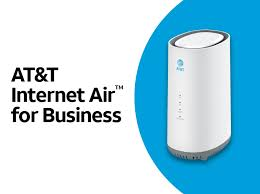
- Two plans: Standard ($65) and Premium ($105).
- Video Management feature is included (can be toggled).
- Premium: includes 250GB priority treatment per bill cycle; after that, speeds may slow when the network is busy.
- Discount note: the product brief references a $5/mo discount when enrolled in AutoPay + Paperless Billing.
- Address-based: you can only use it at the designated service address, and in-building signal quality matters.
Verizon 5G Business Internet (speed tiers + promos)

- Speed tiers: up to 100 Mbps, 200 Mbps, or 400 Mbps (varies with congestion).
- Pricing examples: the 100 Mbps plan is shown at $69/mo, plus taxes/fees and an Economic Adjustment Charge.
- Promo angle: Verizon advertises saving $30/mo when paired with a qualifying business smartphone plan (rules and limits apply).
- Switch offer: Verizon also advertises up to a $1,500 credit to help cover switching costs.
- Guarantees: their page mentions a 10-year price guarantee for new customers in select areas, and a 30-day satisfaction guarantee (terms apply).
T-Mobile 5G Business Internet (simple fixed wireless option)

- Pricing: T-Mobile markets Business Internet starting at $70 (some flows show starting at $60).
- Data policy note: they state speeds may be lower during congestion and can be further reduced after very heavy monthly usage (they cite >1.2TB/mo).
- Fees note: they mention a device connection charge due at sale, and that service is for use only at the activation location.
Reliability comparison (what actually determines “good” fixed wireless)
Most “carrier vs carrier” debates miss the point. The biggest factor is the specific address (signal strength + tower load + building materials + router placement).
- Ask for an address check before you commit.
- Test at the exact location during your busy hours (lunch rush, evenings, weekends).
- Place the gateway right (window/upper area often beats back room / metal racks).
- Have a backup plan if your POS or phone system can’t go down (secondary circuit or LTE/5G failover).
Retail businesses: POS + cameras + guest Wi-Fi
- POS: prioritize consistency and latency over “peak speed.”
- Cameras: watch upload performance; ask how the plan behaves when the network is busy.
- Guest Wi-Fi: isolate it from POS traffic (separate SSID/VLAN if possible).
- Temporary sites: fixed wireless is often ideal when you need internet fast.
Fixed wireless vs fiber (quick rule)
If fiber is available at the address, fiber usually wins for consistency, upload, and overall stability. Fixed wireless is the move when you need:
- fast install,
- a backup circuit,
- a remote location,
- or a temporary setup.
If you meant “business 5G mobile plans comparison”
This article is about internet for a location (fixed wireless). Mobile plans are about phones/tablets and priority levels per line. Different topic, different decision.
If you want, I can spin up a separate “AT&T vs Verizon vs T-Mobile business mobile plans” page so this fixed-wireless page stays focused.
FAQ
- Which major US carriers offer 5G fixed wireless business internet?
AT&T, Verizon, and T-Mobile all market fixed wireless business internet offerings, and all are address-based. - Which is more reliable for business fixed wireless: Verizon, AT&T, or T-Mobile?
Reliability is mainly address + in-building signal + local network load. Test at the location and during business hours. - Is 5G fixed wireless good for retail businesses?
It can be, especially for quick deployment. For POS/cameras, plan for consistency and a backup option if downtime is unacceptable. - Fixed wireless vs fiber for enterprise internet: which is better?
If fiber is available, it usually wins. Fixed wireless is best for speed of install, backup, and hard-to-reach locations.