
Category Archives: Cell Phone Tips and Tricks

Cell phones are an essential part of our lives, but many of us are not taking full advantage of their capabilities. In this category, we will provide you with tips and tricks to help you get the most out of your cell phone.

One important tip is to take care of your cell phone battery. A few simple steps can help extend the life of your battery, such as turning off Bluetooth and Wi-Fi when you’re not using them, lowering your screen brightness, and closing apps that are running in the background.

Another useful tip is to learn how to use your cell phone’s camera features. With today’s advanced camera technology, you can take high-quality photos and videos, but it takes some practice to master the settings and features. We’ll provide you with tips on how to take better pictures, adjust exposure and focus, and use filters and effects to enhance your images.

We’ll also share tips on how to customize your cell phone settings to suit your preferences. You can adjust the font size, display colors, and sound settings to make your phone more user-friendly. You can also set up shortcuts and gestures to quickly access your favorite apps and features.

If you’re worried about your cell phone security, we’ll provide you with tips on how to protect your personal information and data. You can set up password protection, enable two-factor authentication, and use anti-virus software to keep your phone secure.

Finally, we’ll share some fun and creative ways to use your cell phone. You can use your phone to create art, record music, and make videos. You can also download apps to help you learn new skills, stay organized, and improve your productivity.

With these tips and tricks, you can make the most of your cell phone and enhance your mobile experience. Stay tuned for more articles on this category!

Free Phone Deals? Here’s the Catch They Don’t Tell You

Every carrier loves to say “The new iPhone 17 Pro is on us!” Sounds great, right? But here’s the truth: phones aren’t really free. You still have to pay sales tax on the full retail price (around $1,100 for the iPhone 17 Pro), and that’s usually $70–$100 upfront depending on your state.

On top of that, AT&T and other carriers charge upgrade fees. For business customers at AT&T, it’s $35 on installment plans and $50 on 2-year contracts. (Activation fees are waived on new lines.)

Then the carrier gives you bill credits each month for 24–36 months. If you leave early, you owe the rest. So the phone feels free — but only if you stay locked into the plan for years.

Quick Examples:

  • AT&T: Free iPhone 17 Pro with trade-in (iPhone 13 or newer) and unlimited plan.
  • Verizon: Free iPhone 17 Pro or Galaxy S25 with a new line on an unlimited plan.
  • T-Mobile: Free iPhone 17 Pro with trade-in and their high-tier plan.

Takeaway: A “free phone” really means: pay taxes and upgrade fees now, stay on the plan, and wait for monthly credits to cancel out the cost.

➡ Want the full business breakdown with installment options? Read the detailed post on WirelessConsultant.net.
➡ Prefer a bold, no-fluff take? Check the GangsterMobile.com exposé.
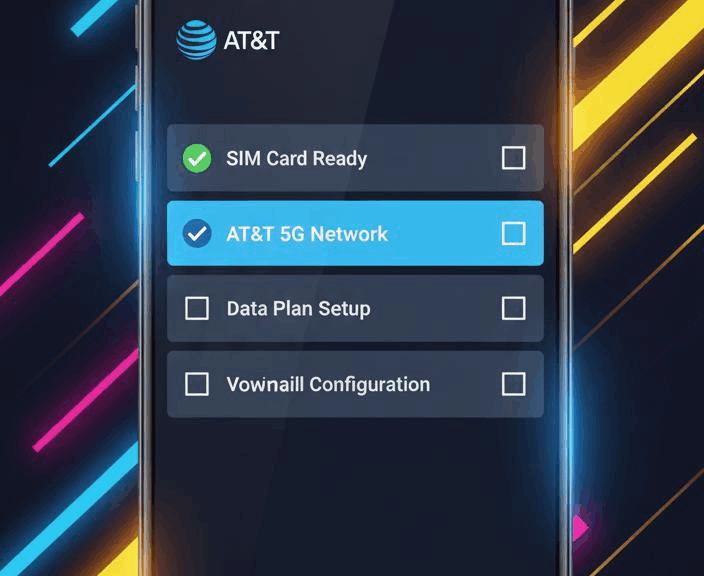
How to Properly Activate a Phone on AT&T (New Lines, Upgrades & Ports)

Activating a Phone on AT&T: New Lines, Upgrades & Ports

Activating a new or upgraded phone on AT&T is an essential step whether you’re starting a new line, upgrading an existing device, or porting your number from another carrier. Many people think transferring their content or setting up their eSIM automatically activates service, but that’s incorrect—these steps only move your data and number, not your active cellular service.

What Really Activates Your AT&T Phone?

To officially activate any new line, upgraded phone, or ported number, use one of these approved AT&T methods:

These will link your device’s IMEI and SIM/eSIM to your account, activating service on the right line.

Content Transfer vs. Activation

It’s easy to confuse content transfers (moving your photos, contacts, apps) or eSIM transfers with actual activation. While both processes are important when setting up a phone, neither triggers carrier activation—the phone won’t have active cellular service until done via the official AT&T activation page or automated number.

What About Number Porting?

If you’re bringing a number from another carrier (port), do not cancel your old service before the port. AT&T handles the switch for you to avoid service gaps. When the port is ready, activate your new device using the AT&T activation tools listed above. Text messages may take a few days to fully transfer after porting—reset your network settings if needed, or contact AT&T customer support.

Upgrade & eSIM Swaps

For upgraded lines or swapping eSIM profiles, always finish the official AT&T activation (online or by phone) first. After that, you can transfer your content or move your eSIM if eligible, but only an actual activation makes your device ready for use on AT&T’s network.

Quick Step-By-Step

  1. Insert your new SIM (or set up eSIM, if directed).
  2. Visit att.com/activations/activatewireless or call 866-895-1099.
  3. Follow prompts to enter your device details and complete activation for your new line, upgrade, or port.
  4. Once active, transfer your content and eSIM as needed.

If you have trouble, call AT&T customer service for support to avoid confusion and ensure your phone works as intended.

How Cellphone Subsidies Changed: A Wireless Insider’s Take

Cellphone Subsidies Past and Present

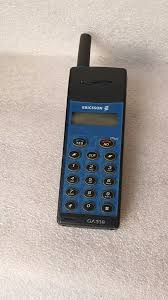
Back in the ‘90s, in my earlier days in the wireless industry, selling phones was a profitable hustle. I’d buy an Ericsson 318 for $220, give it away “free” with a new activation, and still make money. How? My $400 commission covered the phone’s cost, leaving me with a nice profit. Fast forward to 2025, and the wireless game has changed.

Ericsson 318 Phone
The Ericsson 318, a classic ‘90s phone I sold back in the day.

The Contract Era: “Free” Phones Galore

In the ‘90s, a typical AT&T plan cost $39.99 for 450 minutes, plus $10 for 1,000 texts and $30 for smartphone data—about $79.99 total. The phone? Often free or $0.99, thanks to carrier subsidies baked into the plan. Cancel early, and you’d face a fee—like AT&T’s $325, prorated $10/month.

Today: Installments and Transparency

Now, carriers like AT&T have ditched contracts for unlimited plans bundling talk, text, and data. A $600 phone costs $16.66/month for 36 months on top of your plan. Cancel early? You owe the remaining phone balance—no termination fees, just hardware costs. Once paid off, that extra payment drops—unless you upgrade again.

Promotions and Business Perks

Modern subsidies come as trade-in promotions or bill credits, especially for AT&T business customers. Trade in an old phone, and you might get $1,000 off a new device over 36 months. Some businesses can still access 2-year contracts, but most choose installments or upfront purchases for flexibility.

Comparison Chart: Contracts vs. Installments

Contracts vs. Installments: How Phone Subsidies Have Evolved
Feature Old Contract Model (90s) Modern Installment Model (2025)
Phone Cost “Free” or $0.99 (subsidized) $16.66/month for a $600 phone (36 months)
Plan Cost $79.99/month (450 min, text, data) $60/month (unlimited talk, text, data) + phone payment
Cancellation Penalty $325 ETF, prorated $10/month Remaining phone balance due
Contract Length 2 years No contract, 24–36 months for phone payments
Promotions Rare, tied to contract Trade-ins, bill credits over 24–36 months

Why It Matters

Whether you’re a business managing multiple lines or an individual eyeing the latest device, understanding subsidies saves money. For Tampa Bay businesses, I can help you navigate AT&T’s plans, trade-ins, and upgrades to optimize your wireless setup.

Need expert wireless advice? Contact Curtis Matthews, AT&T Wireless Consultant for personalized solutions.